Scheduling that respects availability
Plan individual or batch assignments using offices, properties, inspection types, inspector capacity and calendar availability, including meetings, leave and alternating Friday schedules.
 RouteSphere
Connect scheduling decisions with the realities of field work. RouteSphere helps housing authorities and inspection teams coordinate assignments, routes, mobile inspections and follow-ups.
Give schedulers operational control and inspectors a clear, mobile-friendly workspace, with office, role and assignment boundaries.
Plan individual or batch assignments using offices, properties, inspection types, inspector capacity and calendar availability, including meetings, leave and alternating Friday schedules.
Use geographic clustering, inspector work hours, lunch breaks and existing appointments to plan routes. Preview one-hour arrival windows and open driving directions in Google Maps.
Mark inspectors present or absent, set maximum inspection counts and redistribute work to eligible present inspectors. Keep excess demand visible for scheduler review.
Use category tiles, expandable sections and touch-friendly controls. Record findings, notes, photos and inspection evidence directly from the assigned visit.
Prepare visits online, save local drafts when coverage drops and automatically attempt synchronization when the app reconnects while open or reopened.
Monitor assignments, visit status and ETA separately from the notification queue. Customize templates and review delivery status and errors through configured providers.
Use Admin, Scheduler, Manager and Inspector roles with page and function permissions. Inspectors work with their own authorized assignments.
Maintain office locations, inspector work schedules and calendars. Set user defaults for office, calendar view and accessibility preferences.
Open a visit and move straight into the checklist. Review categories, capture findings and track progress from a smartphone or tablet.
NSPIRE configuration and operating rules are reviewed with each organization during implementation.
RouteSphere in the field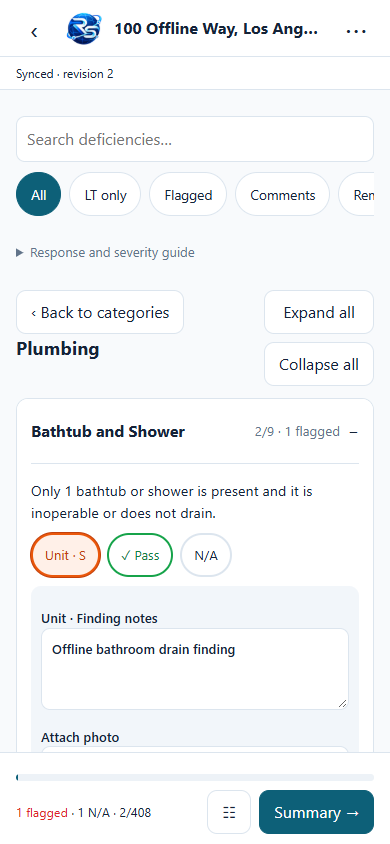
Dedicated REST integration applications and a server processing service exchange inspection updates between Yardi and RouteSphere.
Process inspection changes and agreed scheduling or result updates across both systems.
Process mass-scheduling requests and policy-based reinspections, including configurable follow-up windows and urgent criteria.
Interfaces, data mappings, permissions and policy rules are configured and validated for each deployment. Third-party access and services must be available.
Housing authorities, inspection programs and teams coordinating inspectors across offices, properties and geographic areas. The platform combines planning and field execution in one operational workflow.
Prepared inspections can retain drafts on the device. Automatic synchronization is attempted when connectivity returns while RouteSphere is active or reopened. Keep local data until synchronization is confirmed.
We review your workflows, configure the application, validate integration and scheduling rules, test representative scenarios and train your team before rollout.
Ordeum Systems LLC is RouteSphere’s developer and exclusive copyright owner, responsible for hosting and technical support under the agreed service scope.